Educational
UTME 2026: How to check your JAMB result easily: complete guide for candidates

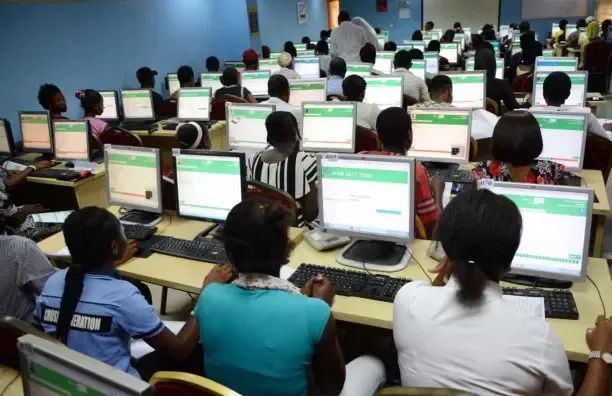
The Very Nigerian congratulates you on completing your JAMB UTME examination.
After weeks of preparation and the pressure of sitting for the Unified Tertiary Matriculation Examination (UTME), the next thing on every candidate’s mind is their result.
For many students across Nigeria, checking JAMB scores is an exciting but sometimes confusing process, especially for first-time candidates who may not know the correct steps.
Whether you want to check your result online or through SMS, it is important to use the right method to avoid mistakes, delays, or unnecessary stress.
This guide provides a clear and simple explanation of how to check your JAMB result, solve common issues, and understand what to do after seeing your score.
No matter the outcome, your JAMB result is just one part of your academic journey.
What matters most is making the right decisions for the next stage of your education.
Table of Contents
- How to Check JAMB Result Online
- How to Check JAMB Result via SMS
- Common Problems and Solutions
- What to Do After Checking Your Result
- How to Print JAMB Result Slip
- How to Check Admission Status
- Frequently Asked Questions
- Final Thoughts
How to Check JAMB Result Online
Checking your JAMB result online is one of the fastest methods. Follow these steps carefully:
Step 1:
- Visit the Official JAMB Portal
- Go to the official JAMB result checking portal.
Step 2:
- Enter Your Information
- Provide either:
- The phone number used during registration, or
- Your JAMB registration number
Step 3:
- Click “Check My Results”
- Your score will appear on the screen immediately if it has been released.
- You can save a screenshot or print the page for future reference.
How to Check JAMB Result Through SMS
If you do not have internet access, the SMS method is a good alternative.
Step 1:
- Send a Text Message
- Using the same phone number linked to your JAMB registration, send:
- UTMERESULT to 55019
- Ensure you have enough airtime before sending the message.
Step 2:
- Wait for Response
- Your result should arrive via SMS shortly. If there is a delay, wait a little and try again later.
Common Issues Candidates Face When Checking Results
Many students experience temporary problems while checking their scores. Here are common ones and what they mean:
1. Result Not Available
This usually means your result is still being processed. Check again later.
2. Result Withheld
This means JAMB has placed your result under review.
3. Wrong Phone Number
Only the phone number used for registration can receive your result through SMS.
4. Poor Network Connection
Slow internet or weak mobile signal can delay result checking.
5. Portal Traffic
When many students check results at the same time, the portal may become slow. Try during off-peak hours.
What to Do After Checking Your Result
After seeing your score, do not stop there. Your next actions are important.
1. Know Your Chances
Compare your score with the cut-off mark of the school and course you want.
2. Prepare for Post-UTME
Some institutions require screening or aptitude tests after JAMB.
3. Watch Admission Updates
Keep checking your school portal and JAMB CAPS for admission progress.
4. Consider Other Options
If your score is lower than expected, explore other schools, diploma programmes, polytechnics, or private universities.
How to Print Your JAMB Result Slip
Some schools require the official result slip during admission.
To print it:
1. Visit the JAMB e-facility portal
2. Log in with your registered email and password
3. Select Print Result Slip
4. Make the required payment
5. Download and print your slip
Keep both digital and hard copies.
How to Check JAMB Admission Status
After results are released, checking admission status becomes important.
Steps:
1. Visit the JAMB CAPS portal
2. Log in with your details
3. Click Check Admission Status
4. Accept or reject any offer given to you
Always monitor regularly.
Frequently Asked Questions (FAQs)
1. When will JAMB release results?
Results are often released within a few days after the examination, depending on JAMB’s schedule.
2. My result is not showing. What should I do?
Wait for some time and try again. Some results take longer to upload.
3. Can I check my result without internet?
Yes. Use the SMS option by sending UTMERESULT to 55019.
4. Can I use another phone number?
No. You should use the same phone number used during registration.
5. Can another person check it for me?
Yes, if they have your correct details or access to your registered phone line.
6. How do I retrieve my registration number?
Check your registration slip or use the official recovery option provided by JAMB.
7. Is the online result printout enough?
For some schools yes, but many institutions request the official JAMB result slip.
8. What if my score is low?
You can change institution, choose another course, or explore alternative admission routes.
9. How often should I check admission status?
At least once every few days during the admission season.
10. Is JAMB CAPS important?
Yes. It is where admission offers are officially processed.
Useful JAMB Support Channels
If you still have issues, contact JAMB through official support platforms:
Official Website: www.jamb.gov.ng
Email Support: [email protected]
Official Social Media Pages
Approved JAMB Offices Near You
Final Thoughts
Completing the JAMB UTME is already a major achievement.
Checking your result is only the beginning of your academic journey.
Whether your score is high or not, stay focused and make smart decisions about your future.
Keep calm, stay informed, and prepare for the next stage.
Your admission success may be closer than you think.




-

 Inside Nigeria2 days ago
Gov Alia names Mathematics Education scholar Eunice Ogbenyi acting HoS of Benue State
-

 Sports22 hours ago
BREAKING: Football shock as Rivers United Bus crashes en route to President’s Cup match
-

 National News22 hours ago
Tinubu fills NDDC board vacancy with nomination of Zainab Marwa
-

 Inside Nigeria2 days ago
Oyo Kidnapping: Obi, Senate call for urgent action on victims’ release
-

 Inside Nigeria2 days ago
₦7.4bn/km Coastal road project completed in Rivers State — Julius Berger
-

 Inside Nigeria1 day ago
Daily Times at 100: Publisher commits N100m to NUJ infrastructure project
-

 Inside Nigeria5 hours ago
NSITF targets AI impact on Gig Workers, Platform Economy
-

 Editorials5 hours ago
Panic across Nigeria as fake school attack rumours trigger mass evacuation in FCT, Ogun, Oyo and Kwara